Workflow
A Workflow behavior allows you to define a guided workflow for a component.
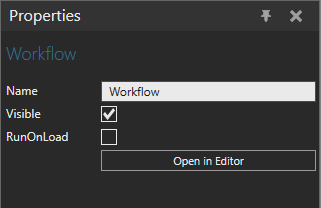
Properties
| Name | Description |
| Name | Defines the name of workflow. |
| Visible | Turns on/off the visibility of workflow. |
| RunOnLoad | Defines if the workflow is opened automatically when the component is added or opened. |
Workflow configurator
The Workflow Configurator panel allows you to create and edit guided workflow for a component. Guided workflow can streamline processes by providing clear, sequential instructions, ensuring tasks are completed accurately and efficiently.
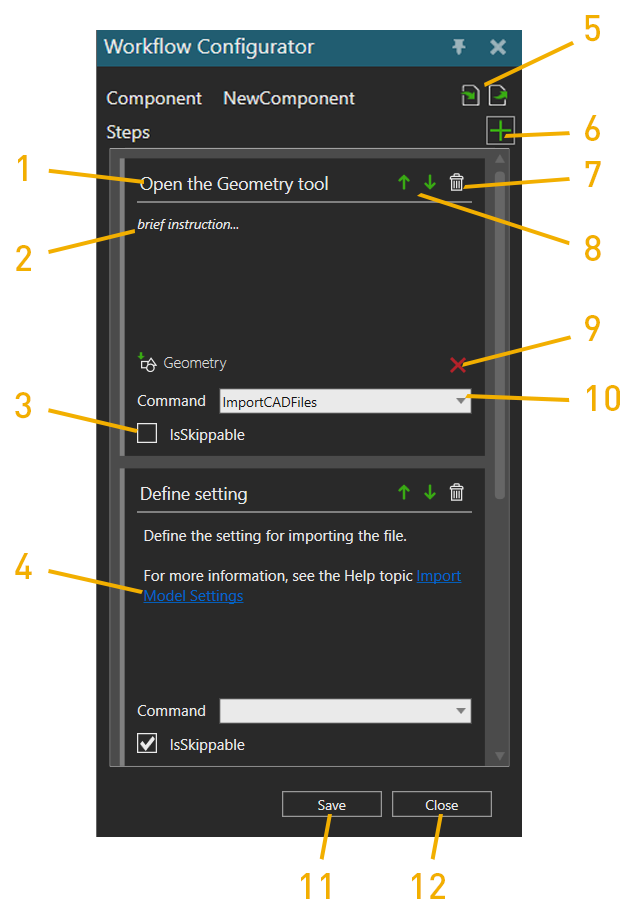
- Step title
- Step instructions
- IsSkippable: Defines if the step is skippable or not.
-
Link in a step: Step instructions can contain links to websites.
To add a link:
-
Select the text where you want to add the link.
-
Click the selected text with the right mouse button
-
Add the URL of the link.
-
- Import/Export: Allows you to import and export workflow.
- Add step
- Delete step
- Move step up/down in the task
- Delete command
- Add command
- Save task
- Close the Workflow Configurator panel.